Microsoft Excel duniya ke sabse popular spreadsheet software tools me se ek hai. Chahe aap student ho, office employee, accountant, freelancer, ya business owner, Excel formulas aapka kaam bahut fast aur accurate bana sakte hain.
Excel formulas repetitive calculations ko automate karte hain, data analysis easy banate hain, aur productivity improve karte hain. Isi wajah se Excel skills almost har office job me important maani jaati hain.
Is guide me hum common Excel formulas ke baare me detail me samjhenge jo har beginner aur professional ko aane chahiye.
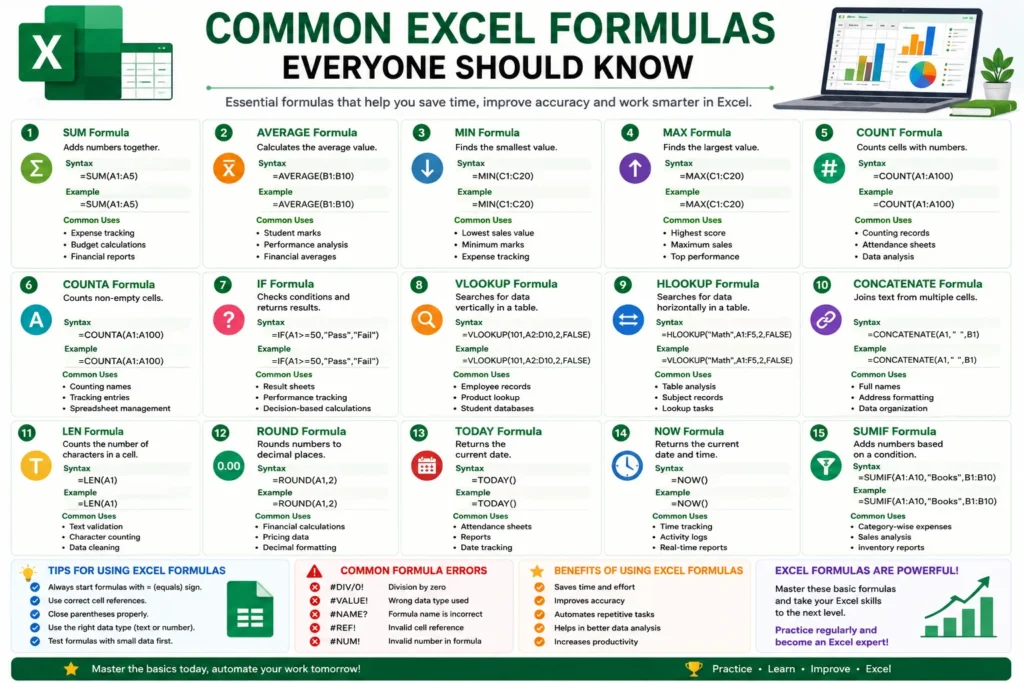
Why Excel Formulas Are Important
Excel formulas ka main purpose manual calculations ko reduce karna hai. Agar aap hundreds ya thousands rows ka data handle karte ho, toh formulas aapka hours ka kaam minutes me kar dete hain.
Excel formulas help in:
- Fast calculations
- Better accuracy
- Data analysis
- Financial reporting
- Office automation
- Inventory management
Related guide:
“Beginner’s Guide to Microsoft Excel”
SUM Formula in Excel
SUM formula numbers ko add karne ke liye use hota hai.
SUM Formula Syntax
=SUM(A1:A5)Ye formula A1 se A5 tak ke saare numbers ko add karega.
Common Uses of SUM Formula
- Expense calculation
- Budget tracking
- Sales reports
- Accounting sheets
SUM formula Excel ka sabse basic aur important formula hai.
AVERAGE Formula in Excel
AVERAGE formula selected numbers ka average calculate karta hai.
AVERAGE Formula Syntax
=AVERAGE(B1:B10)Where AVERAGE Formula is Used
- Student marksheets
- Performance analysis
- Financial averages
- Survey reports
Ye formula large datasets ka average quickly calculate karta hai.
IF Formula in Excel
IF formula conditions check karta hai aur result return karta hai.
IF Formula Syntax
=IF(A1>=50,"Pass","Fail")Agar value 50 se zyada hai toh “Pass” show hoga warna “Fail”.
Uses of IF Formula
- Result sheets
- Attendance systems
- Salary calculations
- Performance tracking
IF formula Excel automation ka important part hai.
VLOOKUP Formula in Excel
VLOOKUP formula tables me data search karne ke liye use hota hai.
VLOOKUP Formula Syntax
=VLOOKUP(101,A2:D10,2,FALSE)Common Uses of VLOOKUP
- Employee records
- Product databases
- Student information systems
- Inventory management
Office environments me VLOOKUP bahut commonly use hota hai.
COUNT Formula in Excel
COUNT formula cells me numbers count karta hai.
COUNT Formula Syntax
=COUNT(A1:A100)Uses of COUNT Formula
- Attendance counting
- Data analysis
- Record management
COUNT formula large spreadsheets manage karne me useful hota hai.
MAX and MIN Formula in Excel
MAX formula highest value find karta hai, jabki MIN formula lowest value detect karta hai.
MAX Formula Example
=MAX(C1:C20)MIN Formula Example
=MIN(C1:C20)Common Uses
- Highest marks
- Lowest sales
- Performance reports
- Financial analysis
CONCATENATE Formula in Excel
CONCATENATE formula multiple text values ko combine karta hai.
CONCATENATE Formula Syntax
=CONCATENATE(A1," ",B1)Uses of CONCATENATE
- Full names create karna
- Address formatting
- Text combination
Modern Excel me CONCAT aur TEXTJOIN bhi available hain.
Common Excel Formula Errors
Beginners aksar kuch common mistakes karte hain.
Forgetting the Equals Sign
Har formula:
se start hota hai.
Wrong Cell References
Incorrect row ya column selection formula errors create karta hai.
Missing Brackets
Parentheses properly close na karne se formula break ho sakta hai.
Tips to Learn Excel Formulas Faster
Agar aap fast learning chahte ho toh:
- Daily practice karo
- Basic formulas se start karo
- Real spreadsheets par kaam karo
- Keyboard shortcuts seekho
- Small datasets use karo
Consistency hi Excel mastery ka real shortcut hai.
Benefits of Learning Excel Formulas
Excel formulas seekhne ke major benefits:
- Time saving
- Better productivity
- Accurate calculations
- Easier reporting
- Career opportunities
Excel skills aaj almost har industry me valuable hain.
Conclusion
Excel formulas spreadsheet automation ka backbone hain. SUM, AVERAGE, IF, VLOOKUP, COUNT, MAX aur MIN jaise formulas daily office work aur data analysis me bahut useful hote hain.
Agar aap beginner ho, toh pehle basic formulas master karo. Jaise-jaise practice badhegi, aap advanced Excel functions aur automation tools bhi easily seekh jaoge.
Regular practice ke saath Excel aapki productivity ko next level tak le ja sakta hai.