Scanned documents are commonly used for invoices, contracts, receipts, reports, certificates, bank statements, and official records. However, scanned files are usually image-based, which means the text inside them cannot be edited directly.
Modern OCR and AI-powered document editing tools now make it possible to edit scanned documents online quickly and accurately without manually retyping the entire file.
In this guide, you will learn how to edit scanned documents online, how OCR technology works, the best editing methods, and tips for improving editing accuracy.
What is a Scanned Document?
A scanned document is a digital copy of a physical paper document created using:
- Scanners
- Mobile phone cameras
- Scanning apps
Scanned files are usually saved as:
- JPG
- PNG
Unlike editable documents, scanned files store content as images rather than selectable text.
This is why OCR technology is required for editing.
You may also like:
“PDF OCR Explained for Beginners”
Why Scanned Documents Cannot Be Edited Directly
Normal scanned documents:
- Do not contain machine-readable text
- Cannot be edited like Word files
- Do not support direct text modification
- Require OCR processing
Without OCR, users would need to manually type the content again.
OCR solves this problem by converting image-based text into editable digital text.
What is OCR Technology?
OCR stands for Optical Character Recognition.
OCR technology scans image-based documents and recognizes:
- Text
- Numbers
- Tables
- Characters
- Document structures
After OCR processing, scanned documents become:
- Editable
- Searchable
- Copyable
Modern AI-powered OCR systems can also preserve:
- Formatting
- Table structure
- Layout alignment
Related guide:
“What is OCR Technology?”
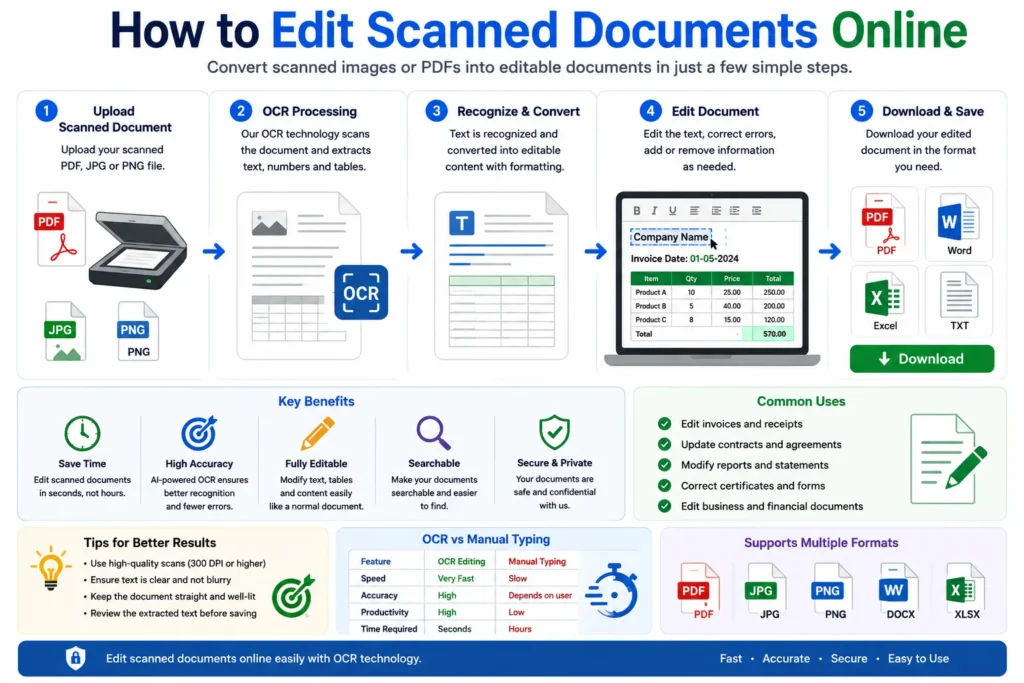
How to Edit Scanned Documents Online
Follow these simple steps to edit scanned files online.
Step 1: Choose an OCR Document Editor
Use a reliable online OCR tool that supports:
- PDF editing
- OCR text recognition
- Layout preservation
- Editable document export
AI-powered tools usually provide better editing accuracy.
You may also read:
“Difference Between OCR PDF and Searchable PDF”
Step 2: Upload the Scanned Document
Click the upload button and select your scanned file.
Supported formats usually include:
- JPG
- PNG
- Scanned images
For better OCR accuracy:
- Use high-resolution scans
- Avoid blurry documents
- Ensure text is readable
Step 3: OCR Processing Begins
The OCR engine scans the document and identifies:
- Text
- Numbers
- Tables
- Rows and columns
- Layout structure
AI-powered systems also analyze:
- Formatting
- Alignment
- Fonts
- Document design
This converts the scanned file into editable digital content.
Step 4: Edit the Extracted Text
After OCR processing finishes, users can:
- Modify text
- Correct errors
- Add information
- Delete content
- Update tables
Most online editors provide:
- Word-style editing
- Spreadsheet editing
- PDF editing tools
Step 5: Save or Download the Edited File
After editing is complete, download the document in formats such as:
- DOCX
- XLSX
- TXT
You can open these files using:
- Microsoft Word
- Excel
- Google Docs
- Google Sheets
Editable PDF vs Scanned PDF
Editable PDF
Editable PDFs already contain selectable text.
These files:
- Allow direct editing
- Support copy and paste
- Usually do not require OCR
Scanned PDF
Scanned PDFs are image-based documents.
These files:
- Cannot be edited directly
- Require OCR processing
- Store text as images
Related article:
“Convert Scanned PDF to Editable Excel”
AI OCR vs Traditional OCR
Modern OCR tools now use artificial intelligence and machine learning.
Traditional OCR
Traditional OCR works well for:
- Printed text
- Clear scans
- Simple layouts
However, it struggles with:
- Handwriting
- Complex tables
- Low-quality images
AI-Powered OCR
AI OCR systems understand:
- Document layout
- Table formatting
- Handwriting styles
- Spreadsheet structures
AI-powered OCR provides:
- Better editing accuracy
- Faster processing
- Improved formatting preservation
You may also like:
“Best AI Tools for Image to Excel Conversion”
Common Uses of Online Scanned Document Editing
Editing scanned documents online is useful for:
- Invoice correction
- Contract updates
- Financial reports
- Receipt editing
- Tax documentation
- Educational materials
- Business records
Businesses often use OCR editing tools to automate document workflows.
Advantages of Editing Scanned Documents Online
Saves Time
Large documents can be edited quickly without manual typing.
Reduces Manual Work
OCR automates text extraction and editing.
Better Accessibility
Users can search and edit scanned content easily.
Improves Productivity
Businesses can process documents faster.
Supports Multiple Formats
Modern OCR tools support:
- Excel
- Word
- Images
Challenges of Editing Scanned Documents
Although OCR technology is improving rapidly, some limitations still exist.
Poor Scan Quality
Blurred documents reduce OCR accuracy.
Handwritten Text
Some handwriting styles remain difficult to recognize.
Complex Layouts
Merged tables and unusual formatting may create editing issues.
Multi-Language Documents
Certain OCR tools may have limited language support.
Tips for Better OCR Editing Accuracy
To improve scanned document editing quality:
- Use high-resolution scans
- Keep pages properly aligned
- Avoid shadows and blur
- Use readable fonts
- Choose AI-powered OCR tools
These small improvements can significantly improve OCR editing performance.
OCR Editing vs Manual Retyping
| Feature | OCR Editing | Manual Retyping |
|---|---|---|
| Speed | Very Fast | Slow |
| Accuracy | High | Depends on user |
| Productivity | Better | Limited |
| Scalability | Easy | Difficult |
| Time Required | Seconds | Hours |
AI-powered OCR clearly provides a faster and more efficient solution for scanned document editing.
You may also read:
“How to Extract Data from PDF Files”
Future of Online OCR Editing
Artificial intelligence is rapidly improving OCR and document editing systems.
Future OCR tools may provide:
- Better handwriting recognition
- Real-time editing
- Smarter layout preservation
- Improved multilingual support
- Higher formatting accuracy
AI-powered document automation will continue transforming digital document management worldwide.
Related article:
“Future of AI in Document Management”
Conclusion
Editing scanned documents online is now much easier with modern OCR and AI-powered technology.
Users can automatically convert scanned files into editable documents, modify text, update tables, and organize information without manually retyping the entire document.
Whether you are editing invoices, contracts, reports, receipts, or business records, OCR-powered online editing tools provide a fast, efficient, and reliable solution for modern document workflows.