Optical Character Recognition (OCR) technology has become an essential tool for students, professionals, and businesses. OCR software can convert scanned documents, images, PDFs, receipts, invoices, and handwritten notes into editable and searchable text.
Whether you need to extract notes from study materials, convert scanned PDFs into Excel spreadsheets, or automate business document processing, OCR software can save significant time and improve productivity.
In this guide, we will explore the best OCR software for students and businesses, compare their features, and help you choose the right solution for your needs.
What is OCR Software?
OCR stands for Optical Character Recognition.
OCR software analyzes images and scanned documents to recognize:
- Text
- Numbers
- Tables
- Forms
- Document layouts
After processing, users can:
- Edit text
- Search content
- Copy information
- Convert files into Word or Excel
- Automate data extraction
OCR is widely used in education, accounting, finance, healthcare, and business operations.
Related guide:
“PDF OCR Explained for Beginners”
Why Students Use OCR Software
Students often work with:
- Printed books
- Study notes
- Research papers
- Handwritten documents
- Scanned PDFs
OCR software helps students:
- Extract text from notes
- Create editable documents
- Save study materials digitally
- Search information quickly
- Improve research workflows
Instead of manually typing content, students can digitize documents in seconds.
Why Businesses Use OCR Software
Businesses process thousands of documents every year.
Common examples include:
- Invoices
- Receipts
- Contracts
- Bank statements
- Employee records
- Tax documents
OCR software helps businesses:
- Reduce manual data entry
- Improve accuracy
- Automate workflows
- Save operational costs
- Increase productivity
Many companies use OCR as part of their digital transformation strategy.
Related article:
“How Businesses Use Excel for Data Management”
Features to Look for in OCR Software
Before choosing an OCR solution, consider these features.
OCR Accuracy
Higher accuracy means fewer corrections after extraction.
PDF Support
The software should support:
- Scanned PDFs
- Searchable PDFs
- Editable PDF conversion
Excel and Word Export
Many users need data in:
- XLSX
- CSV
- DOCX
Multi-Language Support
Businesses often process documents in multiple languages.
Cloud Accessibility
Cloud-based OCR allows users to work from any device.
Best OCR Software for Students and Businesses
1. Adobe Acrobat OCR
Adobe Acrobat is one of the most trusted OCR solutions available today.
Best Features
- High OCR accuracy
- PDF editing
- Searchable PDF creation
- Excel export
- Word export
Best For
- Students
- Professionals
- Business users
Adobe is ideal for users who regularly work with PDF documents.
2. ABBYY FineReader PDF
ABBYY FineReader is considered one of the most advanced OCR platforms.
Best Features
- Industry-leading OCR accuracy
- Multi-language recognition
- PDF comparison
- Advanced document editing
Best For
- Businesses
- Legal firms
- Research organizations
ABBYY performs exceptionally well on complex document layouts.
3. Microsoft OneNote OCR
Microsoft OneNote includes built-in OCR capabilities.
Best Features
- Free OCR functionality
- Image text extraction
- Integration with Microsoft Office
- Note management
Best For
- Students
- Teachers
- Personal productivity
OneNote is an excellent free OCR option for study materials.
4. Google Drive OCR
Google Drive offers free OCR through Google Docs.
Best Features
- Cloud-based processing
- Free access
- Image text recognition
- PDF text extraction
Best For
- Students
- Small businesses
- Basic OCR tasks
Google Drive OCR works surprisingly well for simple documents.
5. Tesseract OCR
Tesseract is one of the most popular open-source OCR engines.
Best Features
- Free and open source
- Multi-language support
- Developer friendly
- High customization
Best For
- Developers
- Technical users
- OCR projects
Tesseract powers many commercial OCR applications.
6. Nanonets OCR
Nanonets uses artificial intelligence to automate document processing.
Best Features
- AI-powered OCR
- Invoice extraction
- Receipt processing
- Workflow automation
Best For
- Businesses
- Finance teams
- Automation projects
Nanonets focuses heavily on business document processing.
7. Amazon Textract
Amazon Textract uses machine learning to extract structured data.
Best Features
- AI document analysis
- Form recognition
- Table extraction
- Cloud integration
Best For
- Enterprises
- Large organizations
- Cloud-based workflows
Textract is particularly effective for invoice and form processing.
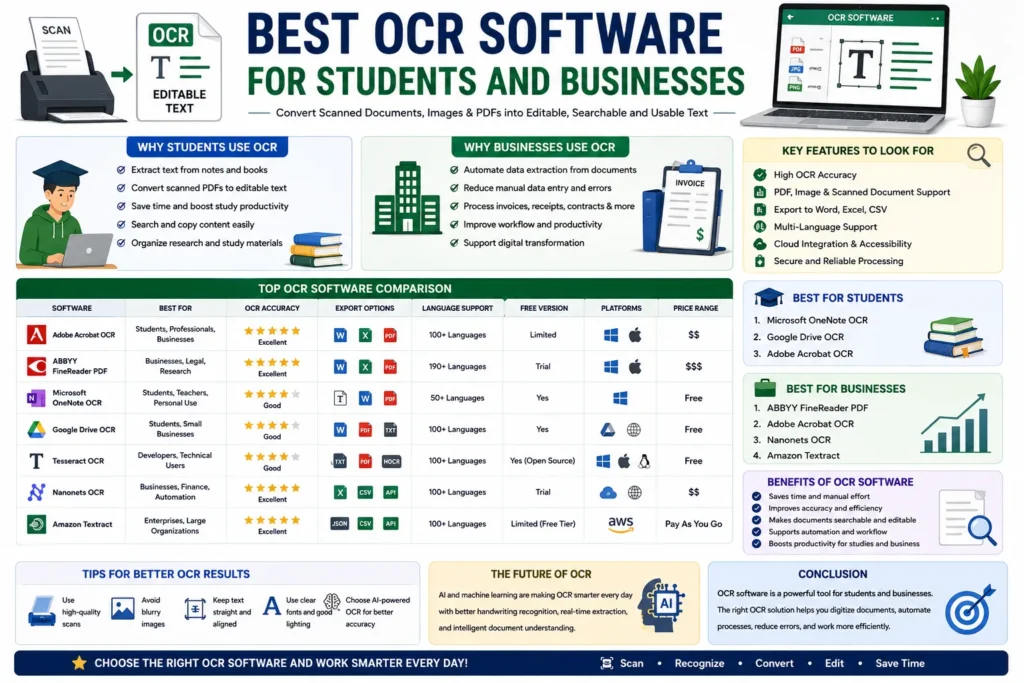
OCR Software Comparison
| OCR Software | Best For | OCR Accuracy | Free Version |
|---|---|---|---|
| Adobe Acrobat OCR | PDFs | Excellent | Limited |
| ABBYY FineReader | Businesses | Excellent | Trial |
| Microsoft OneNote | Students | Good | Yes |
| Google Drive OCR | Beginners | Good | Yes |
| Tesseract OCR | Developers | Good | Yes |
| Nanonets OCR | Automation | Excellent | Trial |
| Amazon Textract | Enterprises | Excellent | Limited |
Best OCR Software for Students
Students generally need:
- Free or affordable tools
- Easy setup
- PDF support
- Note extraction
Recommended Options
- Microsoft OneNote
- Google Drive OCR
- Adobe Acrobat OCR
These tools are ideal for digitizing notes and study materials.
Best OCR Software for Businesses
Businesses usually require:
- High accuracy
- Automation
- Multi-language support
- Data extraction
Recommended Options
- ABBYY FineReader
- Adobe Acrobat OCR
- Nanonets OCR
- Amazon Textract
These platforms provide advanced OCR capabilities for professional environments.
AI-Powered OCR vs Traditional OCR
Modern OCR solutions increasingly use artificial intelligence.
Traditional OCR
Traditional OCR works best with:
- Printed text
- Clean documents
- Simple layouts
AI-Powered OCR
AI OCR understands:
- Tables
- Forms
- Handwriting
- Complex layouts
Benefits include:
- Better accuracy
- Faster processing
- Improved document understanding
AI-powered OCR is becoming the standard for business automation.
Related guide:
“Difference Between OCR PDF and Searchable PDF”
Benefits of OCR Software
Saves Time
Documents can be processed in seconds.
Reduces Manual Data Entry
OCR eliminates repetitive typing.
Improves Accuracy
Modern OCR systems reduce human errors.
Makes Documents Searchable
Users can quickly find information inside scanned files.
Supports Digital Transformation
Businesses can automate document workflows efficiently.
Challenges of OCR Software
Despite major improvements, OCR still has limitations.
Poor Image Quality
Blurry scans reduce recognition accuracy.
Handwriting Recognition
Some handwriting styles remain difficult to interpret.
Complex Formatting
Unusual layouts may create extraction errors.
Language Limitations
Not all OCR tools support every language equally.
Tips for Better OCR Results
To improve OCR accuracy:
- Use high-resolution scans
- Avoid blurry images
- Keep documents aligned
- Use clear fonts
- Choose AI-powered OCR tools
These simple steps can significantly improve extraction quality.
Future of OCR Technology
Artificial intelligence is rapidly transforming OCR systems.
Future OCR tools may provide:
- Better handwriting recognition
- Real-time document analysis
- Improved multilingual support
- Smarter table extraction
- Fully automated workflows
AI-powered OCR will continue changing how students and businesses manage documents.
Related article:
“Future of AI in Document Management”
Conclusion
OCR software has become an essential productivity tool for both students and businesses.
Students use OCR to digitize notes, research papers, and study materials, while businesses use OCR to automate document processing, reduce manual work, and improve efficiency.
Whether you choose Adobe Acrobat, ABBYY FineReader, Google Drive OCR, OneNote, or an AI-powered platform like Nanonets, the right OCR software can save time, improve accuracy, and simplify document management.