Converting handwritten tables into editable Excel spreadsheets was once a difficult task. Traditional OCR systems struggled to recognize handwritten text accurately, especially when tables contained unclear writing or inconsistent formatting.
Today, modern AI-powered OCR technology has made handwritten table conversion much more accurate and efficient. Users can now scan handwritten tables, extract the data automatically, and convert it into editable Excel files within seconds.
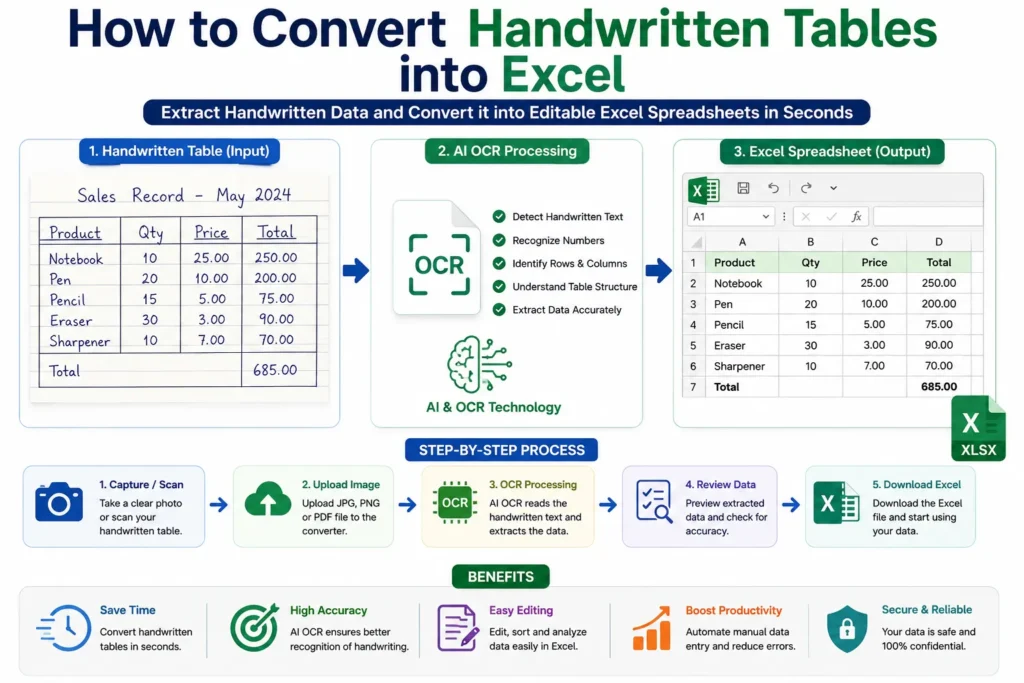
In this guide, you will learn how to convert handwritten tables into Excel, how AI and OCR technology work, and how to improve conversion accuracy.
What is Handwritten Table to Excel Conversion?
Handwritten Table to Excel conversion is the process of extracting handwritten text, numbers, rows, and columns from scanned documents or images and converting them into editable spreadsheet files.
These tools use:
- OCR technology
- AI-based handwriting recognition
- Machine learning systems
to detect and organize handwritten table data automatically.
The extracted data is then converted into:
- XLSX files
- CSV files
- Editable Excel spreadsheets
You may also like:
“How OCR Technology Works in Image to Excel Tools”
Why Convert Handwritten Tables into Excel?
Many businesses, students, researchers, and office professionals still use handwritten records for:
- Attendance sheets
- Survey forms
- Inventory records
- Expense tracking
- Research data
- Business reports
Manually typing handwritten table data into spreadsheets takes time and increases the risk of errors.
Handwritten Table to Excel tools help users:
- Save time
- Reduce manual data entry
- Improve productivity
- Organize records easily
- Improve accuracy
Challenges of Handwritten Table Recognition
Handwritten text is more difficult to process than printed text.
Common challenges include:
- Different handwriting styles
- Poor image quality
- Uneven table formatting
- Missing table borders
- Smudged ink
- Tilted pages
Traditional OCR systems often fail to recognize handwritten data correctly.
Modern AI-powered OCR tools solve many of these problems using machine learning and intelligent pattern recognition.
How to Convert Handwritten Tables into Excel
Follow these simple steps to convert handwritten tables into editable spreadsheets.
Step 1: Capture a Clear Image
Take a photo or scan the handwritten table using:
- Mobile phone camera
- Scanner
- Tablet camera
For better OCR accuracy:
- Use proper lighting
- Avoid blurry images
- Keep the page flat
- Capture the full table
- Use high-resolution images
Clear handwriting and sharp images improve recognition quality significantly.
Step 2: Open a Handwritten Table to Excel Tool
Visit a reliable OCR-based Image to Excel converter that supports handwriting recognition.
A good tool should support:
- JPG
- PNG
- Scanned handwritten documents
AI-powered OCR tools usually provide better handwriting detection and spreadsheet formatting.
You may also read:
“How to Convert Image to Excel Online for Free”
Step 3: Upload the Handwritten Table
Click the upload button and select the image or scanned document.
Most tools support:
- JPG
- JPEG
- PNG
The system prepares the file for OCR processing.
Step 4: AI OCR Processing Begins
The OCR engine scans the handwritten table and identifies:
- Text
- Numbers
- Rows
- Columns
- Table structures
AI-powered handwriting recognition analyzes:
- Character patterns
- Writing styles
- Cell alignment
- Data structure
This process converts handwritten content into machine-readable spreadsheet data.
Step 5: Review Extracted Data
Most tools display a preview before generating the final Excel file.
Check:
- Misspelled words
- Incorrect numbers
- Missing rows
- Table formatting
- Alignment issues
Reviewing the extracted data improves spreadsheet accuracy.
Step 6: Download the Excel File
After processing is complete, download the spreadsheet file.
Supported export formats usually include:
- XLSX
- CSV
You can open the file in:
- Microsoft Excel
- Google Sheets
- Other spreadsheet software
How AI and OCR Technology Work Together
Traditional OCR recognizes printed text by matching character patterns.
Modern AI-based OCR systems go further by:
- Learning handwriting styles
- Understanding table layouts
- Detecting rows and columns
- Improving recognition accuracy over time
Machine learning allows the system to recognize handwritten text more effectively than older OCR technologies.
Related guide:
“What is OCR Technology?”
Common Uses of Handwritten Table Conversion
Handwritten table extraction tools are useful for:
- Educational records
- Attendance sheets
- Medical reports
- Research data collection
- Inventory management
- Financial tracking
- Business documentation
Many organizations automate handwritten data processing to reduce repetitive manual work.
Advantages of Handwritten Table to Excel Tools
Saves Time
Large handwritten tables can be processed within seconds.
Reduces Manual Typing
Users no longer need to enter spreadsheet data manually.
Better Data Organization
Converted spreadsheets are easier to edit and manage.
Improved Productivity
Businesses and researchers can process documents faster.
Easy Spreadsheet Editing
Extracted data can be filtered, sorted, and analyzed easily.
Limitations of Handwritten OCR
Although AI-based OCR is improving rapidly, some limitations still exist.
Poor Handwriting
Unreadable handwriting may reduce accuracy.
Low-Quality Images
Blurred or dark scans make recognition difficult.
Complex Table Structures
Irregular table formatting can confuse OCR systems.
Mixed Languages
Some OCR systems may struggle with multilingual handwritten documents.
Tips for Better Handwritten OCR Accuracy
To improve conversion quality:
- Write clearly
- Use dark ink
- Keep table rows straight
- Avoid overlapping text
- Use high-resolution scans
- Capture the entire document
These simple improvements can significantly increase extraction accuracy.
OCR vs Manual Handwritten Data Entry
| Feature | OCR Conversion | Manual Entry |
|---|---|---|
| Speed | Very Fast | Slow |
| Accuracy | High | Depends on user |
| Productivity | Better | Limited |
| Scalability | Easy | Difficult |
| Time Required | Seconds | Hours |
AI-powered OCR clearly provides a faster and more efficient solution for handwritten table processing.
You may also like:
“OCR vs Manual Data Entry”
Future of Handwritten OCR Technology
Artificial intelligence is rapidly improving handwriting recognition systems.
Future OCR tools may provide:
- Better handwriting accuracy
- Real-time table extraction
- Improved multilingual support
- Smarter table analysis
- Higher spreadsheet formatting accuracy
AI-powered document automation will continue transforming data entry and document management workflows.
Related article:
“Future of AI in Document Management”
Conclusion
Converting handwritten tables into Excel is now much easier with modern AI and OCR technology.
Users can automatically extract handwritten rows, columns, text, and numerical data from scanned documents and convert them into editable spreadsheets quickly and efficiently.
Whether you are managing attendance records, research data, financial tracking, or business reports, Handwritten Table to Excel tools provide a practical solution for reducing manual work and improving productivity.