Many people get confused between OCR PDFs and Searchable PDFs because both involve text recognition and document accessibility. However, they are not exactly the same.
Understanding the difference between OCR PDFs and Searchable PDFs is important for students, businesses, accountants, researchers, and office professionals who work with scanned documents, invoices, reports, and digital records.
In this guide, we will explain what OCR PDFs and Searchable PDFs are, how they work, their advantages, and the key differences between them.
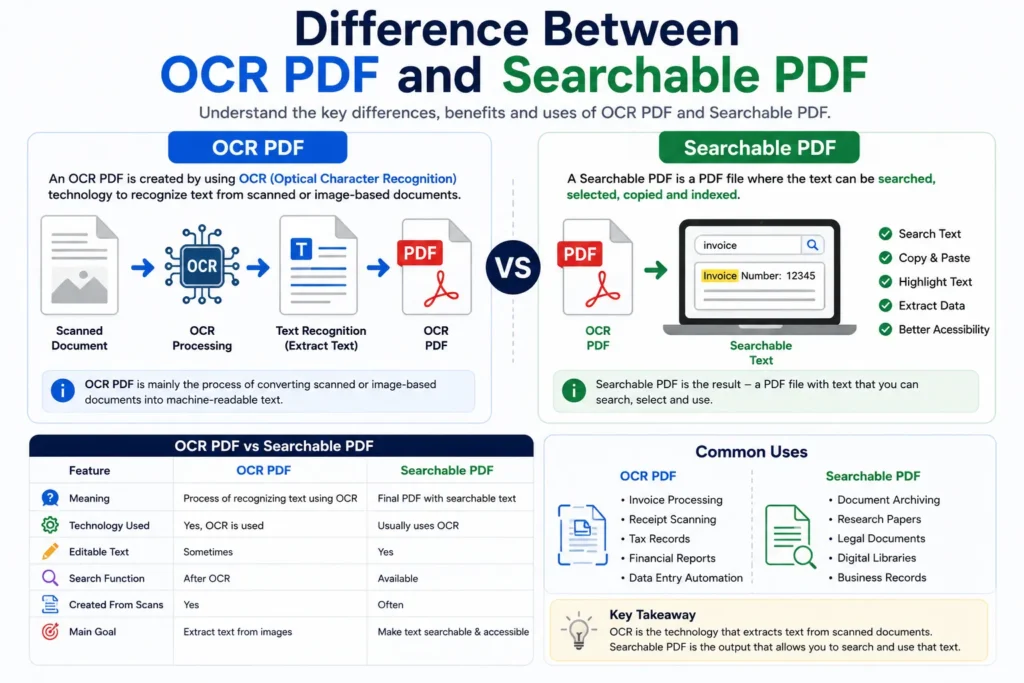
What is an OCR PDF?
An OCR PDF is a PDF document processed using OCR (Optical Character Recognition) technology.
OCR software scans image-based or scanned PDF files and recognizes:
- Text
- Numbers
- Tables
- Characters
- Document structures
The OCR system extracts this information and converts it into machine-readable text.
OCR PDFs are usually created from:
- Scanned documents
- Printed papers
- Invoice scans
- Receipt images
- Screenshot PDFs
You may also like:
“PDF OCR Explained for Beginners”
What is a Searchable PDF?
A Searchable PDF is a PDF file where the text inside the document can be:
- Searched
- Selected
- Copied
- Indexed
Searchable PDFs may already contain digital text, or they may become searchable after OCR processing.
For example:
- A digitally created PDF from Microsoft Word is already searchable.
- A scanned PDF becomes searchable only after OCR technology extracts the text.
Searchable PDFs improve document accessibility and usability significantly.
How OCR Creates Searchable PDFs
OCR and Searchable PDFs are closely connected.
The OCR process works like this:
- Scan the document
- Detect text from images
- Recognize characters
- Generate hidden machine-readable text
- Create a searchable PDF layer
The original document appearance remains visually similar, but users can now:
- Search keywords
- Copy text
- Highlight content
- Extract data
Related guide:
“What is OCR Technology?”
Main Difference Between OCR PDF and Searchable PDF
The biggest difference is:
- OCR PDF refers to the process or technology used to recognize text from scanned documents.
- Searchable PDF refers to the final output document where the text becomes searchable and selectable.
In simple words:
OCR is the technology.
Searchable PDF is the result.
OCR PDF vs Searchable PDF Comparison Table
| Feature | OCR PDF | Searchable PDF |
|---|---|---|
| Purpose | Text recognition | Text accessibility |
| Uses OCR Technology | Yes | Usually |
| Editable Text | Sometimes | Yes |
| Search Function | After OCR | Available |
| Created from Scans | Yes | Often |
| Copy and Paste Support | After OCR | Yes |
| Main Goal | Extract text | Make text searchable |
Why OCR PDFs Are Important
OCR PDFs help users convert image-based documents into editable and searchable digital files.
Common benefits include:
- Faster document processing
- Reduced manual typing
- Better data extraction
- Improved productivity
- Spreadsheet conversion support
OCR is especially useful for scanned PDFs that do not contain selectable text.
Why Searchable PDFs Are Useful
Searchable PDFs improve document usability and accessibility.
Users can:
- Find keywords instantly
- Copy information
- Extract text
- Organize records easily
- Improve workflow efficiency
Businesses often use searchable PDFs for document archiving and digital record management.
Examples of OCR PDF and Searchable PDF
Example of OCR PDF
A scanned invoice uploaded into OCR software becomes an OCR PDF during processing.
The OCR engine detects:
- Invoice numbers
- Dates
- Product details
- Prices
Example of Searchable PDF
After OCR processing finishes, the invoice becomes searchable.
Users can now:
- Search invoice numbers
- Copy prices
- Extract table data
- Convert information into Excel
Related article:
“How to Extract Data from PDF Files”
Common Uses of OCR PDFs
OCR PDFs are widely used for:
- Invoice processing
- Receipt scanning
- Tax records
- Financial reports
- Research papers
- Data entry automation
- Spreadsheet extraction
Businesses use OCR systems to reduce repetitive manual work.
Common Uses of Searchable PDFs
Searchable PDFs are useful for:
- Digital archives
- Document indexing
- Research documents
- Legal records
- Educational materials
- Business document management
Searchable files improve organization and search efficiency.
AI OCR vs Traditional OCR
Modern OCR systems now use artificial intelligence and machine learning.
Traditional OCR
Traditional OCR works well for:
- Printed text
- Simple layouts
- High-quality scans
However, it struggles with:
- Handwriting
- Complex tables
- Poor-quality images
AI-Powered OCR
AI OCR systems understand:
- Layout structure
- Table formatting
- Spreadsheet alignment
- Handwriting patterns
AI-powered OCR provides:
- Better accuracy
- Faster processing
- Improved searchable PDF quality
You may also read:
“Best AI Tools for Image to Excel Conversion”
Advantages of OCR and Searchable PDFs
Saves Time
Users can process large documents quickly.
Improves Searchability
Searchable PDFs allow instant keyword searches.
Reduces Manual Work
OCR automates text extraction from scanned documents.
Better Data Organization
Searchable documents are easier to manage and archive.
Supports Spreadsheet Conversion
OCR PDFs can be converted into Excel spreadsheets efficiently.
Challenges of OCR PDFs
Although OCR technology is improving rapidly, some limitations still exist.
Poor Scan Quality
Blurry scans reduce OCR accuracy.
Handwritten Text
Some handwriting styles remain difficult to recognize.
Complex Layouts
Merged tables and unusual formatting may confuse OCR systems.
Multi-Language Support
Certain OCR tools may have limited language compatibility.
Tips for Better OCR and Searchable PDFs
To improve OCR results:
- Use high-resolution scans
- Keep documents properly aligned
- Avoid blurry images
- Use readable fonts
- Choose AI-powered OCR tools
These small improvements can significantly improve searchable PDF quality.
OCR vs Manual Data Extraction
| Feature | OCR Processing | Manual Entry |
|---|---|---|
| Speed | Very Fast | Slow |
| Accuracy | High | Depends on user |
| Productivity | Better | Limited |
| Scalability | Easy | Difficult |
| Time Required | Seconds | Hours |
AI-powered OCR clearly provides a faster and more efficient solution for document digitization.
You may also like:
“How to Convert PDF to Excel Without Losing Formatting”
Future of OCR and Searchable PDFs
Artificial intelligence is rapidly improving OCR and searchable document systems.
Future OCR tools may provide:
- Better handwriting recognition
- Smarter document indexing
- Real-time text extraction
- Improved multilingual support
- Higher searchable accuracy
AI-powered document automation will continue transforming digital document management worldwide.
Related article:
“Future of AI in Document Management”
Conclusion
OCR PDFs and Searchable PDFs are closely connected but serve different purposes.
OCR refers to the technology that recognizes text from scanned or image-based documents, while Searchable PDFs are the final documents where users can search, copy, and access the extracted text.
Understanding this difference helps users choose the right document processing workflow for data extraction, spreadsheet conversion, digital archiving, and business automation.