PDF tools have become essential for students in schools, colleges, universities, and online learning programs. Students regularly work with assignments, notes, research papers, scanned documents, presentations, eBooks, and study materials in PDF format.
Modern online PDF tools now provide advanced features such as:
- PDF editing
- PDF conversion
- OCR text extraction
- File compression
- PDF merging
- PDF splitting
- PDF to Excel conversion
These tools help students save time, organize documents, and improve productivity without installing heavy software.
In this guide, we will explore the best online PDF tools for students, their features, advantages, and how they help simplify academic work.
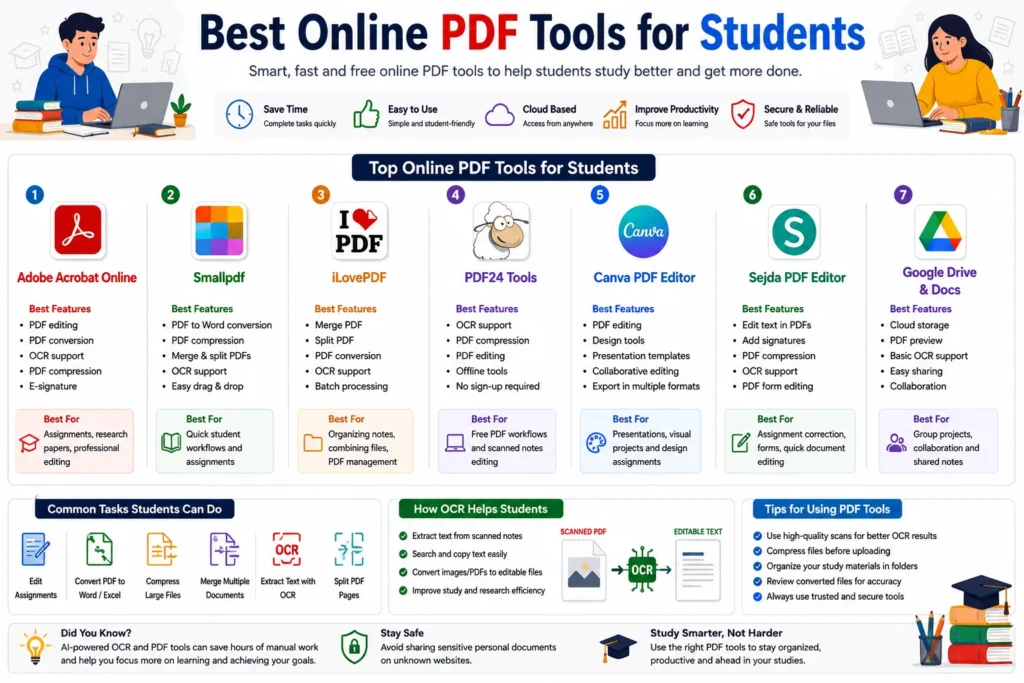
Why Students Need Online PDF Tools
Students often work with multiple file formats and scanned documents. PDF tools help make these files easier to manage and edit.
Common student tasks include:
- Editing assignments
- Converting PDFs into Word or Excel
- Compressing large files
- Extracting notes from scanned documents
- Merging project files
- Organizing study materials
Online PDF tools simplify these tasks and improve workflow efficiency.
You may also like:
“How to Edit Scanned Documents Online”
Features Students Should Look For in PDF Tools
Before choosing a PDF tool, students should consider these important features.
PDF Editing
The tool should allow:
- Text editing
- Highlighting
- Annotation
- Signature support
OCR Support
OCR (Optical Character Recognition) helps extract text from scanned notes and image-based PDFs.
File Conversion
Useful conversions include:
- PDF to Word
- PDF to Excel
- PDF to JPG
- JPG to PDF
PDF Compression
Compression reduces file size for:
- Assignment uploads
- Email attachments
- Online submissions
Ease of Use
Students need simple and fast tools without complicated setup.
Best Online PDF Tools for Students
1. Adobe Acrobat Online
Adobe Acrobat Online is one of the most popular PDF platforms for students.
Best Features
- PDF editing
- PDF conversion
- OCR support
- PDF compression
- PDF signing
Best For
- Assignments
- Research papers
- Professional document editing
Adobe provides reliable PDF formatting and high-quality OCR processing.
2. Smallpdf
Smallpdf offers simple browser-based PDF tools designed for everyday use.
Best Features
- PDF to Word conversion
- PDF compression
- Merge and split PDFs
- OCR support
- Easy drag-and-drop interface
Best For
- Quick student workflows
- Study materials
- Assignment submissions
Smallpdf is widely used because of its clean and beginner-friendly interface.
3. iLovePDF
iLovePDF is one of the most useful free PDF platforms for students.
Best Features
- PDF merging
- PDF splitting
- PDF conversion
- OCR support
- Batch processing
Best For
- Organizing notes
- Combining assignments
- PDF management
Students commonly use iLovePDF for fast file organization tasks.
4. PDF24 Tools
PDF24 provides multiple free PDF utilities with browser and desktop support.
Best Features
- OCR support
- PDF compression
- PDF editing
- Offline tools
- No complicated setup
Best For
- Free PDF workflows
- Study material editing
- Secure offline processing
PDF24 is popular among students looking for free and lightweight PDF solutions.
5. Canva PDF Editor
Canva is useful for students who want visually attractive presentations and documents.
Best Features
- PDF editing
- Design tools
- Presentation templates
- Collaborative editing
Best For
- College presentations
- Visual projects
- Design assignments
Canva is especially useful for creative and presentation-based academic work.
6. Sejda PDF Editor
Sejda provides easy online PDF editing with multiple document management tools.
Best Features
- Edit text in PDFs
- Add signatures
- PDF compression
- OCR support
- PDF form editing
Best For
- Assignment correction
- Form filling
- Quick document editing
Sejda offers a clean interface suitable for beginners.
7. Google Drive and Google Docs
Google Drive provides basic PDF handling and cloud storage integration.
Best Features
- Cloud access
- PDF preview
- Document collaboration
- Basic OCR support
- Easy sharing
Best For
- Group projects
- Online collaboration
- Shared notes
Students frequently use Google tools for collaborative academic work.
Related guide:
“What is OCR Technology?”
Best PDF Tools for Different Student Needs
| Student Need | Recommended Tool |
|---|---|
| PDF Editing | Adobe Acrobat Online |
| Free PDF Management | iLovePDF |
| OCR for Scanned Notes | PDF24 Tools |
| Presentation Design | Canva |
| Group Collaboration | Google Drive |
| Quick Editing | Smallpdf |
| Form Editing | Sejda PDF Editor |
How OCR Helps Students
OCR technology is extremely useful for students working with:
- Scanned notes
- Printed study materials
- Research papers
- Screenshot PDFs
OCR allows students to:
- Extract text
- Search documents
- Convert PDFs into editable files
- Copy notes easily
Modern AI-powered OCR tools improve text recognition accuracy significantly.
Related article:
“PDF OCR Explained for Beginners”
Benefits of Online PDF Tools for Students
Saves Time
Students can edit and organize documents quickly.
Improves Productivity
PDF tools reduce repetitive manual work.
Easy Assignment Submission
Compression and conversion tools simplify file uploads.
Better Study Organization
Students can merge and organize notes efficiently.
Cloud Accessibility
Online tools allow access from:
- Mobile devices
- Tablets
- Laptops
- Browsers
Challenges of Free PDF Tools
Although free PDF tools are useful, some limitations still exist.
Usage Limits
Some platforms limit:
- Daily conversions
- File sizes
- OCR usage
Watermarks
Certain free tools may add watermarks to exported files.
Limited OCR Accuracy
Free OCR tools may struggle with:
- Handwriting
- Complex layouts
- Poor-quality scans
Privacy Concerns
Students should avoid uploading sensitive personal documents to unknown platforms.
Tips for Students Using Online PDF Tools
To improve workflow efficiency:
- Use high-quality scans
- Compress large files before upload
- Organize study materials in folders
- Use OCR for scanned notes
- Review converted files carefully
These small habits can improve productivity significantly.
AI and the Future of PDF Tools
Artificial intelligence is rapidly improving online PDF platforms.
Future student PDF tools may provide:
- Better OCR accuracy
- Real-time note extraction
- Smart document summarization
- AI-based study assistance
- Improved collaboration features
AI-powered document management will continue transforming digital education workflows.
Related article:
“Future of AI in Document Management”
Conclusion
Online PDF tools help students manage assignments, study materials, scanned notes, presentations, and research documents more efficiently.
Using OCR and AI-powered PDF platforms, students can edit, convert, compress, organize, and extract information from PDFs quickly and easily.
Whether you need PDF editing, OCR note extraction, assignment management, or collaborative document workflows, modern online PDF tools provide practical solutions for academic productivity and digital learning.