Microsoft Excel is one of the most popular spreadsheet applications used worldwide for data management, calculations, reporting, budgeting, accounting, analysis, and business operations.
Whether you are a student, office worker, accountant, freelancer, or business owner, learning Excel can improve productivity and open many career opportunities.
In this beginner-friendly guide, you will learn the basics of Microsoft Excel, important features, common formulas, practical uses, and tips to start using Excel efficiently.
What is Microsoft Excel?
Microsoft Excel is a spreadsheet software developed by Microsoft.
Excel allows users to:
- Store data
- Perform calculations
- Create tables
- Analyze information
- Generate charts
- Organize records
Excel files are commonly saved in formats such as:
- XLSX
- XLS
- CSV
Excel is widely used in:
- Businesses
- Schools
- Colleges
- Accounting firms
- Data analysis
- Office management
Why Learn Microsoft Excel?
Excel is one of the most valuable computer skills for beginners.
Learning Excel helps users:
- Organize data efficiently
- Automate calculations
- Create reports
- Analyze information
- Improve productivity
- Prepare for office jobs
Many careers require Excel knowledge, including:
- Accounting
- Data entry
- Finance
- Administration
- Business analysis
- Inventory management
You may also like:
“Best Online PDF Tools for Students”
Understanding the Excel Interface
When you open Excel, you will see several important sections.
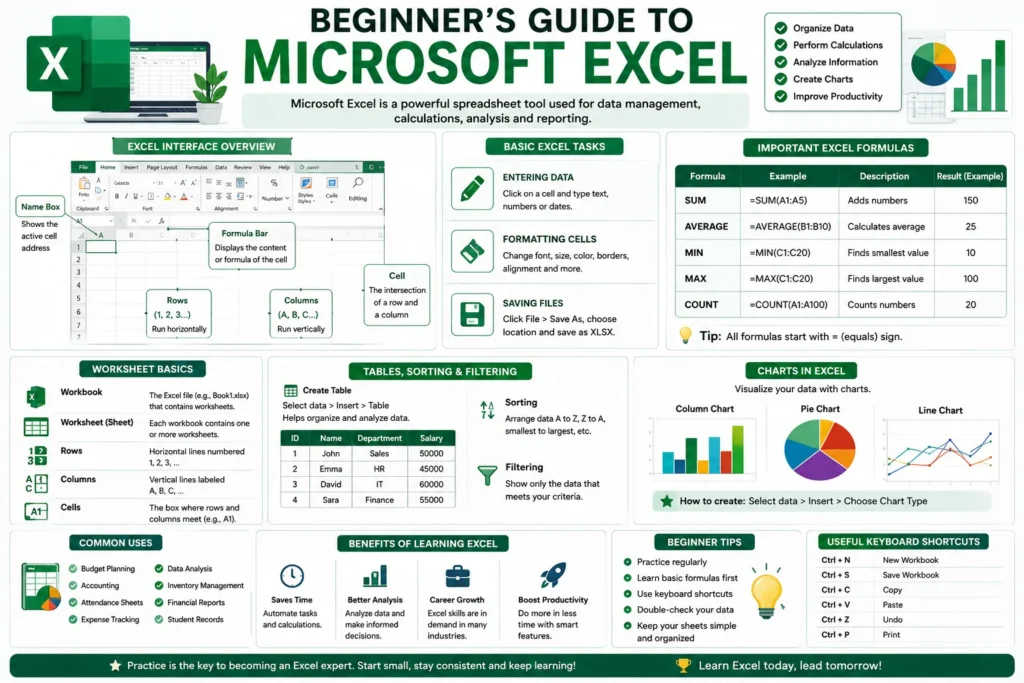
1. Workbook
A workbook is the main Excel file that contains spreadsheets.
2. Worksheet
Each workbook contains worksheets, also called sheets.
Worksheets are made up of:
- Rows
- Columns
- Cells
3. Rows
Rows run horizontally and are numbered:
- 1
- 2
- 3
- 4
4. Columns
Columns run vertically and are labeled:
- A
- B
- C
- D
5. Cells
A cell is the box where rows and columns intersect.
Examples:
- A1
- B2
- C5
Cells store:
- Text
- Numbers
- Formulas
- Dates
Basic Excel Tasks for Beginners
Entering Data
Click on a cell and type:
- Names
- Numbers
- Dates
- Information
Press Enter to move to the next row.
Formatting Cells
Excel allows users to:
- Change font size
- Apply colors
- Make text bold
- Add borders
- Adjust alignment
Formatting improves spreadsheet readability.
Saving Excel Files
To save a file:
- Click File
- Select Save As
- Choose location
- Enter file name
- Save as XLSX
Always save work regularly to avoid losing data.
Important Excel Formulas for Beginners
Excel formulas help automate calculations.
Every formula starts with:
symbol.
1. SUM Formula
Used to add numbers.
Example:
=SUM(A1:A5)This adds values from A1 to A5.
2. AVERAGE Formula
Calculates the average value.
Example:
=AVERAGE(B1:B10)3. MIN Formula
Finds the smallest number.
Example:
=MIN(C1:C20)4. MAX Formula
Finds the largest number.
Example:
=MAX(C1:C20)5. COUNT Formula
Counts cells containing numbers.
Example:
=COUNT(A1:A100)Understanding Excel Tables
Excel tables help organize large amounts of data.
Tables make it easier to:
- Sort information
- Filter records
- Apply formulas
- Analyze data
To create a table:
- Select data
- Click Insert
- Choose Table
Sorting and Filtering Data
Sorting arranges data in order.
Examples:
- Alphabetical order
- Highest to lowest
- Date order
Filtering displays only selected information.
This feature is useful for:
- Expense tracking
- Student records
- Sales reports
Creating Charts in Excel
Excel allows users to create visual charts such as:
- Bar charts
- Pie charts
- Line graphs
Charts help present data clearly.
To create a chart:
- Select data
- Click Insert
- Choose chart type
Charts are commonly used in:
- School projects
- Business reports
- Data analysis
Common Uses of Microsoft Excel
Excel is used for:
- Budget planning
- Accounting
- Attendance sheets
- Expense tracking
- Data analysis
- Inventory management
- Financial reports
- Student records
Businesses and organizations rely heavily on Excel for daily operations.
Benefits of Learning Excel
Improves Productivity
Excel automates repetitive tasks and calculations.
Better Data Organization
Users can manage large amounts of information easily.
Useful for Careers
Excel skills are valuable for many office jobs.
Saves Time
Formulas and automation reduce manual work.
Supports Data Analysis
Excel helps users understand and analyze information quickly.
Beginner Mistakes to Avoid
Many beginners make common Excel mistakes.
Not Saving Files Regularly
Always save work frequently.
Typing Formulas Incorrectly
Remember formulas must start with:
Using Too Much Formatting
Excessive colors and styling can reduce readability.
Ignoring Data Validation
Check calculations carefully to avoid errors.
Tips for Learning Excel Faster
To improve Excel skills quickly:
- Practice daily
- Learn basic formulas first
- Create simple spreadsheets
- Use real-life examples
- Watch Excel tutorials
- Practice keyboard shortcuts
Consistent practice is the fastest way to improve.
Excel vs Google Sheets
| Feature | Microsoft Excel | Google Sheets |
|---|---|---|
| Offline Use | Yes | Limited |
| Advanced Features | More powerful | Simpler |
| Collaboration | Available | Strong |
| Performance | Better for large files | Good for cloud use |
| Cost | Paid | Free basic version |
Both tools are useful, but Excel provides more advanced spreadsheet features.
Advanced Excel Features
After learning basics, users can explore:
- Pivot tables
- Conditional formatting
- Data validation
- Macros
- Power Query
- VLOOKUP
- XLOOKUP
These features are widely used in professional environments.
Career Opportunities with Excel Skills
Learning Excel can help users prepare for jobs such as:
- Data entry operator
- Accountant
- Office assistant
- Business analyst
- MIS executive
- Inventory manager
Excel remains one of the most in-demand office skills worldwide.
Future of Excel and AI
Artificial intelligence is rapidly improving spreadsheet software.
Modern Excel now includes:
- AI suggestions
- Automated analysis
- Smart formulas
- Data insights
- OCR integrations
AI-powered spreadsheet tools will continue improving productivity and automation.
Related article:
“Best AI Tools for Image to Excel Conversion”
Conclusion
Microsoft Excel is a powerful and beginner-friendly spreadsheet application used for organizing data, calculations, reporting, and analysis.
By learning basic formulas, tables, charts, and spreadsheet management, beginners can improve productivity and build valuable computer skills for education, business, and professional careers.
With regular practice, Excel can become one of the most useful tools for managing information efficiently in daily life and work.