OCR technology has completely changed the way people handle data extraction from images and scanned documents. Instead of manually typing tables, invoices, receipts, or printed records into spreadsheets, OCR-powered Image to Excel tools can automatically detect and convert text into editable Excel files within seconds.
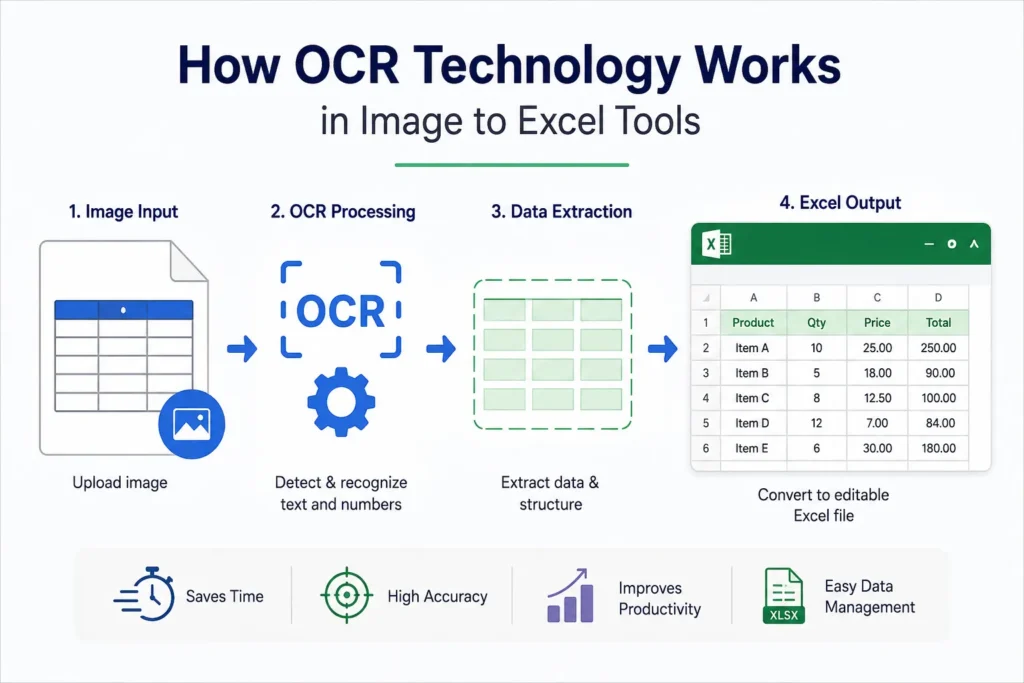
Businesses, students, accountants, researchers, and office professionals now rely heavily on OCR systems to save time and improve productivity. In this article, we will explain how OCR technology works in Image to Excel tools, its benefits, limitations, and why AI-powered OCR is becoming essential for modern document processing.
What is OCR Technology?
OCR stands for Optical Character Recognition.
It is a technology that allows computers to identify and extract text, numbers, and table structures from images, scanned documents, PDFs, and screenshots.
OCR systems convert non-editable visual content into machine-readable and editable data.
For example, OCR can convert:
- Printed invoices
- Scanned reports
- Screenshot tables
- Handwritten forms
- Bank statements
- JPG or PNG images
into editable Excel spreadsheets or text documents.
You can also read:
“Best Ways to Extract Table Data from Images”
Why OCR is Important in Image to Excel Tools
Without OCR technology, Image to Excel converters would not be able to understand the content inside images.
OCR helps:
- Detect text and numbers
- Identify rows and columns
- Recognize table structures
- Convert scanned data into editable spreadsheet format
This eliminates manual data entry and speeds up document processing significantly.
How OCR Technology Works
OCR systems follow multiple processing steps to convert image-based content into editable Excel data.
1. Image Upload
The process starts when a user uploads:
- JPG files
- PNG images
- Scanned PDFs
- Screenshots
- Document photos
The Image to Excel tool receives the file and prepares it for processing.
2. Image Preprocessing
Before OCR detection starts, the system improves image quality for better accuracy.
Preprocessing may include:
- Noise removal
- Brightness adjustment
- Contrast enhancement
- Deskewing tilted images
- Sharpening blurry text
This step is important because low-quality images reduce OCR performance.
3. Text Detection
After preprocessing, the OCR engine scans the image and identifies areas that contain text or numbers.
The software separates:
- Characters
- Words
- Rows
- Columns
- Table boundaries
Modern AI-powered OCR systems can also recognize complex layouts and multi-column tables.
4. Character Recognition
The OCR engine compares detected characters with stored language patterns and machine learning models.
It identifies:
- Letters
- Numbers
- Symbols
- Spreadsheet values
Advanced OCR systems can recognize multiple languages and fonts.
5. Table Structure Analysis
Image to Excel tools must understand table formatting to create proper spreadsheets.
The system analyzes:
- Cell alignment
- Column spacing
- Row structures
- Table borders
This step ensures that extracted data appears correctly inside Excel sheets.
6. Data Conversion into Excel
After recognition is complete, the OCR system converts the extracted data into:
- XLSX files
- CSV files
- Editable spreadsheets
Users can then:
- Edit data
- Filter rows
- Apply formulas
- Organize information easily
If you want to learn more about spreadsheet management, read:
“Beginner’s Guide to Microsoft Excel”
Types of OCR Used in Image to Excel Tools
Traditional OCR
Traditional OCR works by matching character shapes with predefined patterns.
It works well for:
- Printed text
- Clear documents
- Simple tables
However, it struggles with:
- Handwriting
- Complex layouts
- Distorted images
AI-Based OCR
Modern Image to Excel tools use AI-powered OCR systems.
AI OCR provides:
- Better accuracy
- Smarter table recognition
- Improved handwriting detection
- Faster processing
- Layout understanding
AI technology has greatly improved document conversion quality.
Common Uses of OCR Image to Excel Tools
OCR technology is widely used in:
- Accounting
- Banking
- Data entry
- Education
- Inventory management
- Research work
- Business reporting
Many companies automate document processing using OCR-based systems to reduce manual work.
Benefits of OCR Technology
Saves Time
OCR can process documents within seconds instead of hours.
Reduces Manual Work
Users no longer need to type large amounts of data manually.
Improves Accuracy
AI-powered OCR reduces human typing errors.
Better Productivity
Businesses can process invoices, receipts, and reports more efficiently.
Easy Data Management
Converted Excel files are easier to edit, search, organize, and analyze.
Challenges of OCR Technology
Although OCR is powerful, it still has limitations.
Poor Image Quality
Blurry or dark images reduce recognition accuracy.
Handwriting Issues
Some handwritten documents are difficult to recognize correctly.
Complex Tables
Older OCR systems may struggle with merged cells and unusual layouts.
Language Limitations
Some OCR tools support limited languages and fonts.
Tips for Better OCR Results
To improve OCR accuracy:
- Use high-resolution images
- Avoid shadows and blur
- Upload properly cropped documents
- Keep tables clear and readable
- Use AI-powered OCR tools
OCR vs Manual Data Entry
| Feature | OCR Technology | Manual Entry |
|---|---|---|
| Speed | Very Fast | Slow |
| Accuracy | High | Depends on user |
| Cost Efficiency | Better | Expensive over time |
| Productivity | High | Limited |
| Scalability | Easy | Difficult |
OCR clearly provides a more efficient solution for handling large amounts of data.
Future of OCR in Image to Excel Tools
OCR technology is evolving rapidly with artificial intelligence and machine learning.
Future OCR systems may provide:
- Better handwriting recognition
- Real-time table extraction
- Smarter document analysis
- Improved multilingual support
- Higher accuracy for complex layouts
AI-based document automation is expected to become a major part of business workflows worldwide.
You may also like:
“Future of AI in Document Management”
Conclusion
OCR technology is the foundation of modern Image to Excel tools. It allows users to extract text, tables, and numerical data from images and convert them into editable spreadsheets automatically.
Whether you are processing invoices, scanned PDFs, receipts, or reports, OCR-powered tools can save time, reduce errors, and improve productivity significantly.
As AI technology continues to improve, OCR systems will become even smarter, faster, and more accurate for businesses and everyday users.